Selected work / Chapter 05
Siyana صيانة
Arabic for “maintenance”
Facility management
Multi-tenant CAFM and SLA engine
A facility-management platform for FM and MEP contractors working under strict SLAs: clocks that pause correctly, a technician app with camera-only evidence, a live command centre and map, a client portal and automatic breach escalation.
Siyana#2026 · roles to try - Used by
- Helpdesk dispatchers, Operations managers, Technicians, Clients
- Built with
- Angular 21 · Django 5.2 LTS · Django REST Framework · PostgreSQL 16 · Celery + Redis · Docker Compose · Django Channels · Leaflet + OpenStreetMap · Dexie (IndexedDB)
- Languages
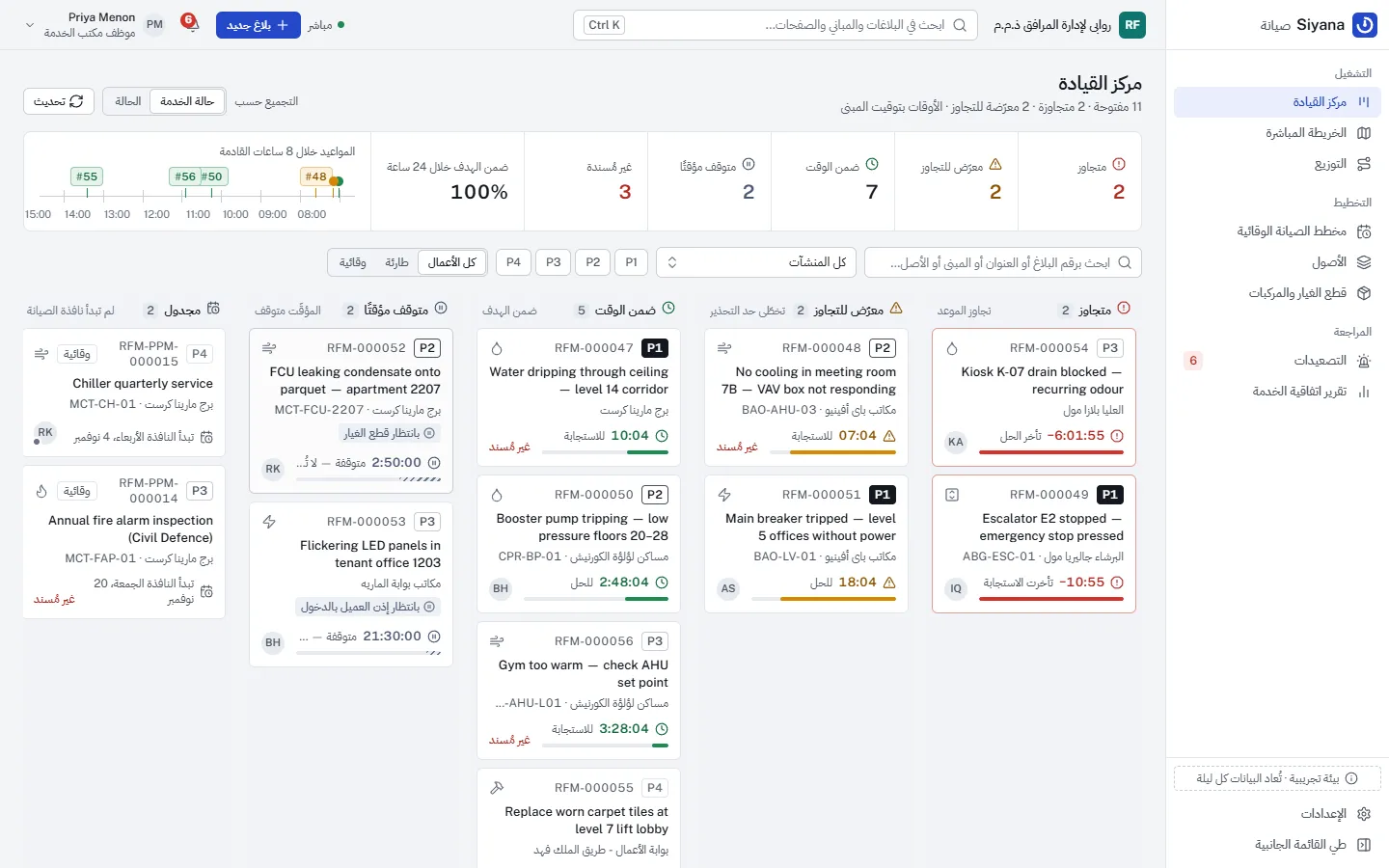
- English and Arabic, with full right-to-left layouts
- Source
- Private repository — available on request by email
The problemWhat the operation is up against.
FM and MEP contractors in the UAE and Saudi Arabia maintain towers, offices and malls under strict service levels: a P1 fault in a Dubai tower may have to be attended within 10–15 minutes and fixed within two hours, with penalties per breach. In practice the clock is argued about after the fact. Was the technician waiting for a part? Did the client deny access? Was the photo taken on site, or is it last month’s?
Siyana makes the contract’s clock the system of record: deadlines come from the contract’s priority matrix, pauses are recorded with their reason, field evidence is camera-only and checked by the server, and every event lands in an append-only audit log to the second.
Who uses it4 roles, one system.
Helpdesk dispatchers
See every ticket on a Kanban coloured by SLA state and on a live map, and assign the right technician.
Operations managers
Set the SLA matrix per contract, receive breach SMS and acknowledge escalations.
Technicians
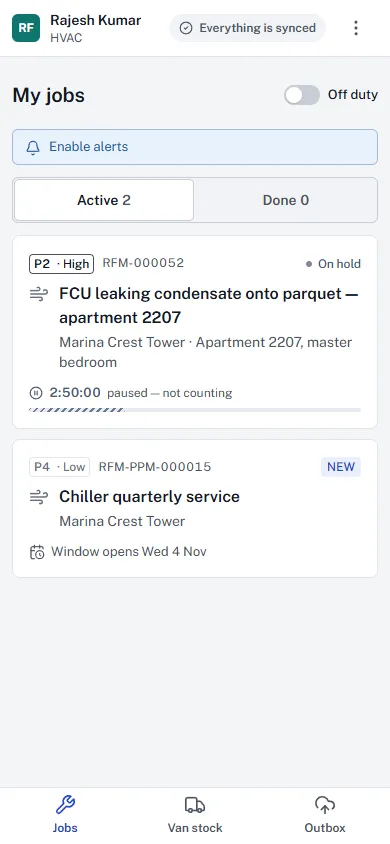
Get assignments pushed to their phone, work offline, take camera-only before and after photos, draw parts from van stock and collect a digital sign-off.
Clients
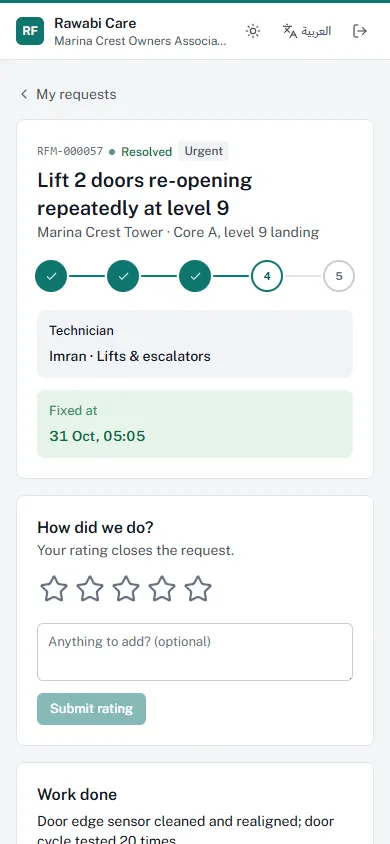
Facility managers and shop tenants raise requests in plain language, follow them live and rate the result.
What was builtThe working parts.
A dynamic SLA engine
Each contract carries response and resolution targets per priority, P1 to P4, snapshotted on the ticket when it is logged. The arithmetic is a pure module mirrored in TypeScript, both unit-tested.
Clocks that pause correctly
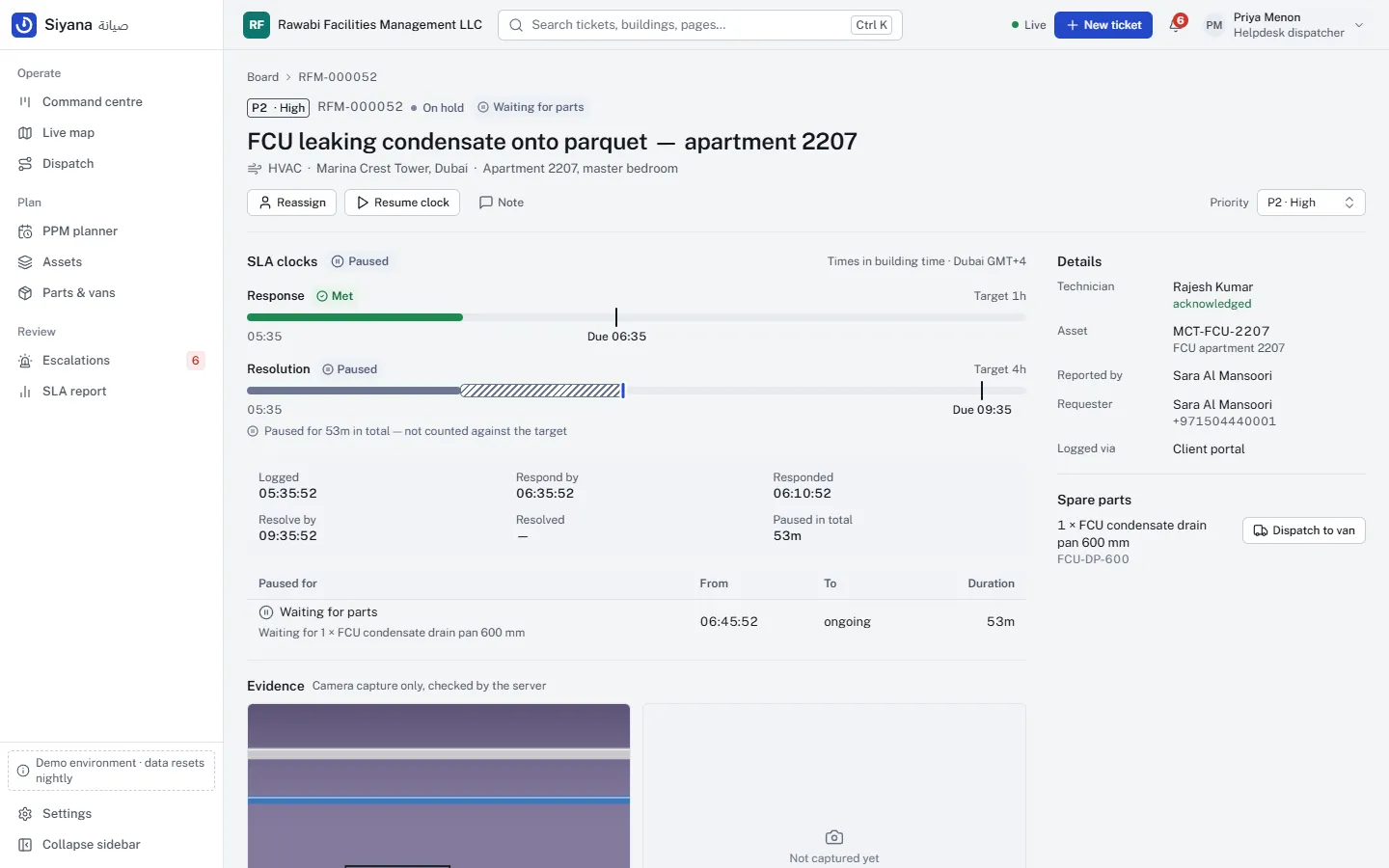
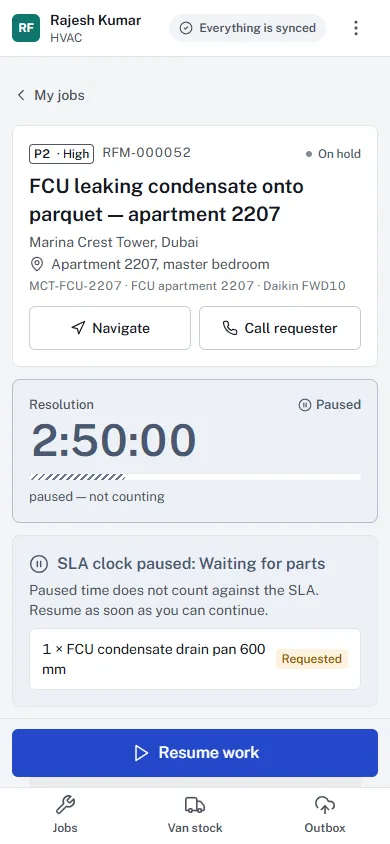
Waiting for parts or client access puts the job on hold. On resume, every pause that began before a deadline pushes it out by exactly its length; a pause after a breach changes nothing.
A technician app
Assignments arrive over WebSocket with vibration, a chime and a notification; jobs show live countdowns; jobs, van stock and the parts catalogue work offline through an outbox.
Camera-only evidence
There is no file input: photos come from the live camera with a burned-in watermark and EXIF written by a small TypeScript writer. The server re-checks type, size, capture time and duplicates; work cannot start without a before photo or be signed off without an after photo.
Van stock that cannot be overdrawn
Issuing a part is a single conditional update behind a CHECK constraint, so concurrent or replayed requests never overdraw; transfers from the store appear on the technician’s phone live.
A PPM auto-scheduler
Daily to annual maintenance for chillers, air handlers, fire pumps, generators and lifts; month-end anchors without drift, UAE and KSA weekends, idempotent generation and bounded catch-up.
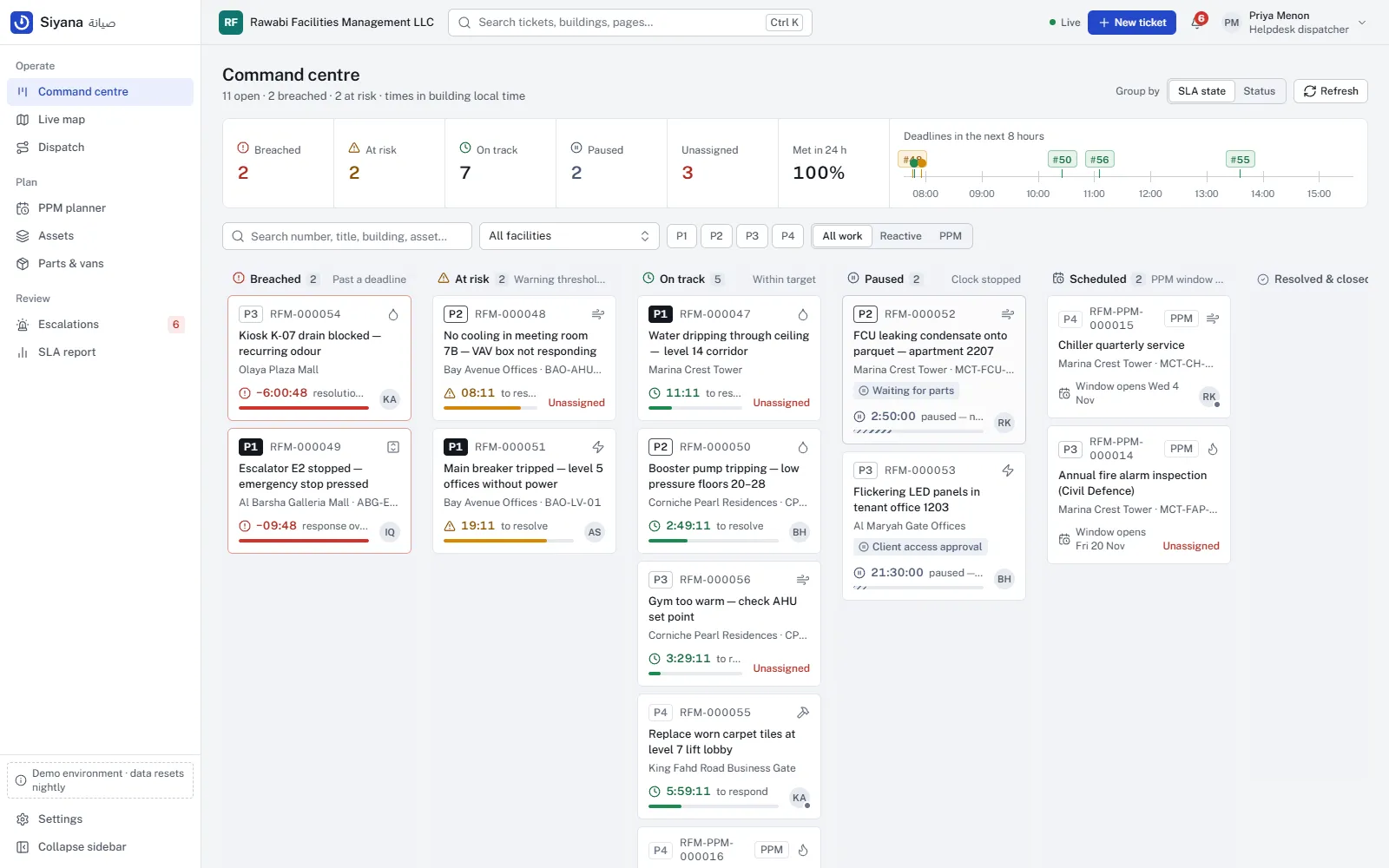
A command centre organised by SLA state
Lanes for breached, at-risk, on-track, paused and scheduled work, an SLA pulse strip and an eight-hour horizon of the clocks falling due next. Each ticket draws its clocks on a time axis — active time, hatched pauses, warning threshold, deadline and now — in the building’s time zone.
Dispatch and live map
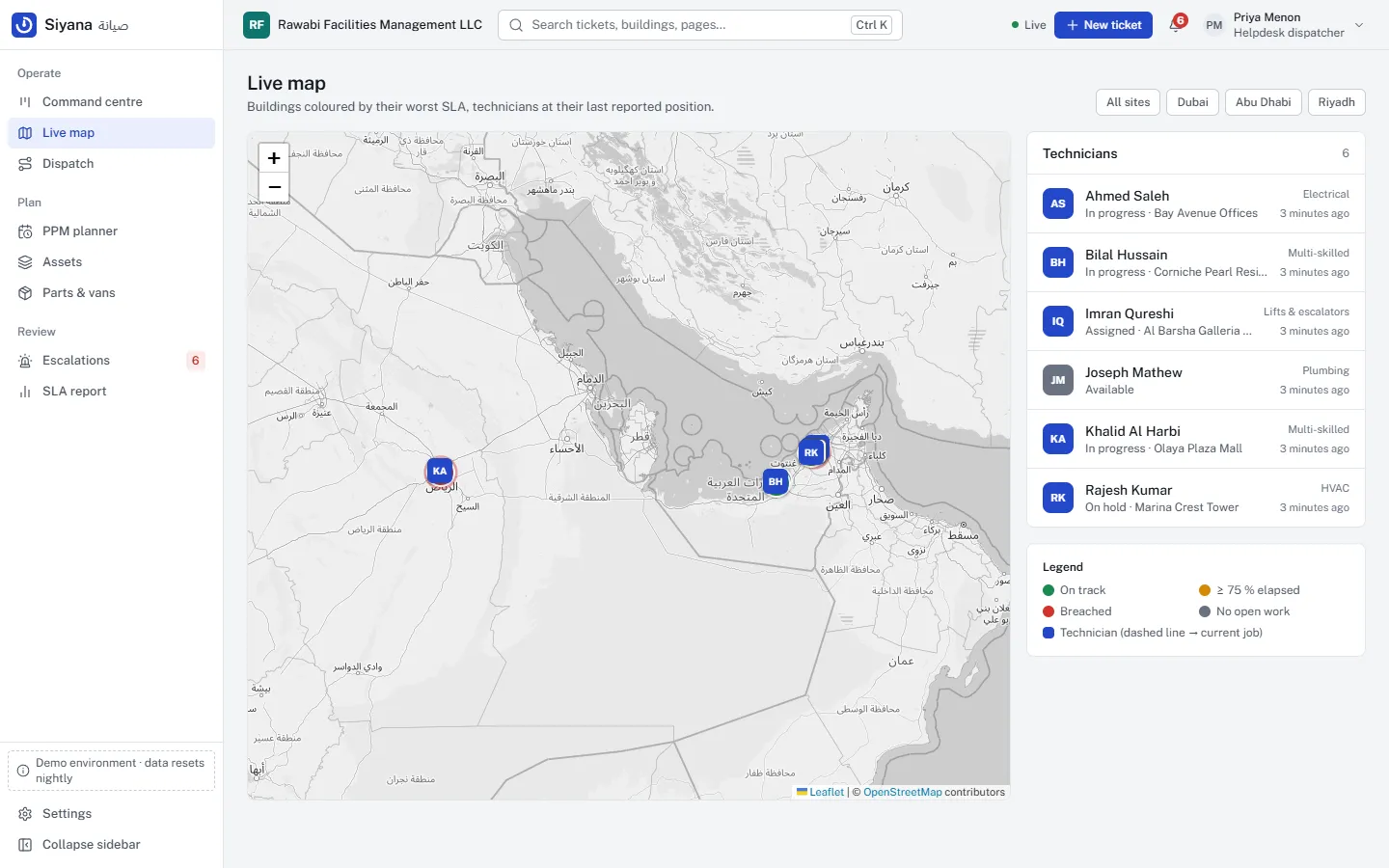
Technicians ranked by trade match, distance from their last reported position and workload, with a Leaflet and OpenStreetMap view of the site and the candidates.
Escalation, portal and reporting
A monitor runs every minute and fires each warning or breach once, by WebSocket and SMS. Clients follow requests live and rate them, each tenant gets its own branding and light or dark theme, and an append-only audit log feeds a monthly SLA report to the second.
Design rulesThe rules it keeps.
The decisions that make the system trustworthy, enforced on the server and in the database rather than left to the screen.
Evidence is enforced by the server, not the UI.
Camera only, capture time inside the job, no reused pictures, a before photo before work starts, an after photo and a complete checklist before sign-off.
Breach flags follow the evidence.
An offline start recorded before the deadline is honoured, and flagged; re-prioritising a breached ticket is refused.
History is replayed, not faked.
The demo data was produced by driving every historical ticket through the real services with the clock frozen at each instant, so its audit rows and escalations are exactly what the live system produces.
ArchitectureHow it fits together.
An Angular command centre, technician PWA and client portal; a Django REST API around a pure SLA engine; Channels for live push; Celery beat for the every-minute monitor, PPM generation and SMS — on PostgreSQL with row-level security.
- Front end
- Angular 21 (standalone, zoneless, signals), Tailwind CSS 4 with per-tenant brand scales built with color-mix(), CDK BiDi, a Dexie outbox, Leaflet with OpenStreetMap and a TypeScript EXIF writer.
- API
- Django 5.2 LTS and Django REST Framework: the ticket state machine, photo validation, atomic stock moves and a client-safe serializer for the portal.
- Real time
- Django Channels with role-based fan-out: tickets to the board, assignments to the technician’s own channel.
- Jobs
- Celery beat runs the SLA monitor every minute, generates PPM work orders and delivers SMS through pluggable Twilio and Unifonic adapters, with retries.
- Data
- PostgreSQL 16 with row-level security on every tenant table, an append-only audit log protected by a trigger, and the tenant–status–deadline index the monitor walks.
- Delivery
- Docker Compose with NGINX (app, WebSocket upgrade, protected evidence photos), Gunicorn, Uvicorn, Celery worker and beat. CI runs pytest against PostgreSQL, Vitest, the production build and a Trivy scan.
Quality evidenceTested where it matters.
- 93 backend tests (pytest); row-level security, the audit trigger and the concurrent van-stock test run on PostgreSQL in CI.
- 28 frontend unit tests (Vitest): SLA maths, SLA-state grouping, the EXIF writer, offline updates and branding contrast.
- Ruff lint and format checks, a migration-drift check, an Angular production build with bundle budgets, and Trivy scans of both container images in GitHub Actions.
ScreensOn the desk and in the field.
A calm command centre: one cobalt accent on cool neutrals, with green, amber and red used only for SLA state — always with an icon and a word, never colour alone. Priority is shown by weight, so a breached P3 still reads red and an on-track P1 does not. Public Sans with IBM Plex Sans Arabic, tabular figures for every clock, full right-to-left layouts, a dark theme, and per-tenant colour on the client portal.
Try the demoSign in as any role.
The demo runs on realistic seeded data, with a second tenant to show that one customer never sees another’s records.
The sign-in page offers each demo role in one click, and the demo data resets every night at 00:30 UTC.
| User | Role | What to try |
|---|---|---|
dispatcher | Helpdesk dispatcher | Board: assign the new P1, dispatch a part to a van, the live map, the SLA report. |
manager | Operations manager | Settings → SLA matrix per contract; alerts; acknowledge escalations. |
tech | Technician | On a phone-sized window: acknowledge the push alert, take the before photo, start, request a part (the clock pauses), resume, take the after photo, sign off. |
client | Client facility manager | Raise an emergency, follow it live, rate it. |
client2 | Mall tenant | Sees only their own requests. |
admin | Administrator | Branding — colours, monogram, portal title — with a live preview. |
nfs_admin | Admin of a second FM tenant | Sees none of the first tenant’s data. |
Password for every demo user Siyana#2026
- Each browser tab keeps its own session: open another tab at /login?switch to sign in as a second role side by side.
Out of scopeNot built yet — on purpose.
- Web Push to a closed app — alerts arrive while the app is open or running in the background.
- Business-hours SLA calendars and public holidays — clocks run around the clock.
- Reopening a resolved ticket, and cancellations.
- Live Twilio or Unifonic delivery — the adapters are tested against mocked HTTP.
- Capture on a real phone camera has not been tested yet — the simulated viewfinder and the server-side photo checks are.